Blog

  • Stay Zeroed-In with an Infusionsoft Checklist

    Taking on a new customer’s Infusionsoft application (or opening your own) can quickly become a bit overwhelming.

    After all, with the litany of amazing functions and features to explore, it‘s very easy to get distracted once you jump inside an application.

    On more than one occasion, I’ve gone into my application with the intention of setting up a Broadcast, only to find myself monitoring sales, cleaning my list and completely forgetting why I logged into the application in the first place.

    Distraction when setting up an account – be it for a customer or yourself – doesn’t just reduce your efficiency, it means lost time, lost money and, most frighteningly, lost opportunity.

    So amidst all the swirling distractions we’re subjected to on a daily basis (whether inside Infusionsoft or out) how does one manage to stay on-task?

    Consider employing a checklist to make sure you stay zeroed-in on what needs doing.

    When it comes to IS empowerment, we often talk about the importance of video tutorials and comprehensive user guides, but intelligent checklists may hold even more value, particularly when it comes to saving time within Infusionsoft.

    Checklists help us to do a number of things from dotting the “i’s” and crossing the “t’s”, to staying on-course when we are striving to set up a complicated application within a tight timeframe.

    But what should our checklist include? How long does it need to be?

    These and other questions inspired us here at The API Guys to partner with several of our amazing tribe members to give you a checklist worthy of your time, attention and needs…WOO HOO!!!

    Now, bear in mind that we by no means claim this to be the “be all, end all” of Infusionsoft checklists, but we certainly did our darn best to capture the areas we feel will be of the greatest value to you, the Infusionsoft user.

    So, the next time you need to set up an application, take full advantage of this list. Simply put, it’s a GREAT guide and will help you save precious time when working in Infusionsoft.

    Ultimately, our main hope is that you find this checklist forever useful and incorporate it into your normal Infusionsoft-routine. With that said, please, please, please feel absolutely free to submit your removal or addition suggestions to kirsten@theapiguys.com. Though this guide is going to be an unending work-in-progress, your help will make it the most complete resource available.

    Don’t be shy—We desperately want this to be an all-out Tribe effort so, seriously, DO NOT hold back! You won’t hurt our feelings 🙂

    With any luck, this checklist will add some serious sweetness to your Infusionsoft life sooner rather than later.

    Click here to view and download your copy

  • Save time with the Infusionsoft Branding Center

    Branding CenterCreating your default email templates in the Infusionsoft Branding Center is a must when getting started. We didn’t for a long time … and we lost a TON of time formatting and re-formatting emails.

    You know the old saying, “Do as I say, not as I do.”?

    Not only did we lose time, our branding was inconsistent. Yikes!

    The Branding Center allows you to create default templates for:

    • emails
    • forms
    • landing pages
    • thank you pages
    • direct mail pieces

    You also manage your default logo and communication footers there.

    Take it from us. This is one time saving step you don’t want to skip!

    Click here to access Infusionsoft Branding Center information and set up instructions.

  • Quick Tip – How and Why To Use Campaign Links

    Summary:

    In the How and Why to Use Campaign Links Quick Tip, 2014 Infusionsoft Partner of the Year, Kim Snider, throws in a few extra Infusionsoft tidbits for her Art of Campaign Building Mastery Class by quickly explaining when, where, why and how Campaign Links should be applied.

    Quick Tip – How and Why To Use Campaign Links:

    Time Stamped Show Notes:

    • 00:01 – Introduction from Kim Snider
    • 00:09 – This video is a special bonus for the Art of Campaign Building Mastery Course
    • 00:22 – THIS is an absolutely perfect example of when you may want to use a Campaign Link
    • 00:30 – A Campaign Link is a link set up AT the Campaign level, rather than in the email itself
    • 00:45 – Unfolding the details of When and Why to use Campaign Links
    • 02:00 – Changing where the link points to is one of the fundamental purposes of Campaign Links
    • 02:40 – This is similar to a Campaign Merge Field
    • 03:05 – Returning to update the Link (on the back end) to change where it points
    • 03:45 – The Pros and Cons of Campaign Links
    • 03:50 – They cannot be used in a broadcast email
    • 04:15 – Eliminates the need to send a NEW email for link corrections/replacements—Dynamic Links
  • 05:30 – Kim’s Contact Info and End of Quick Tip
  • Easy Multi-Step Infusionsoft Forms

    NEWS FLASH! That Thank You page for your web form DOES NOT have to lead to a Thank You! Make good use of this simple trick to add more segmenting options after getting the initial opt-in, break up a lengthy form into bite-size portions, add an upsell or next-steps actions. The possibilities are endless when you know how.

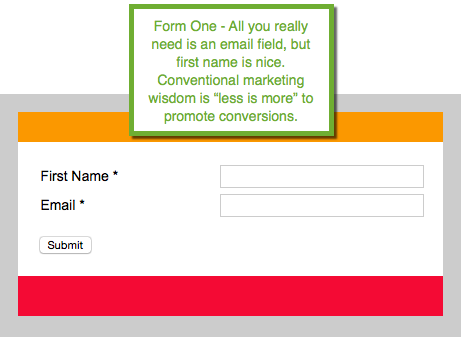
    Create 2 web forms in your campaign

    step-one


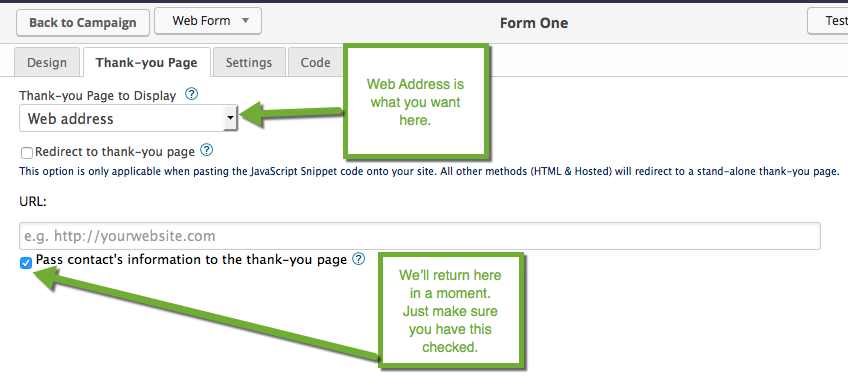
    step-two

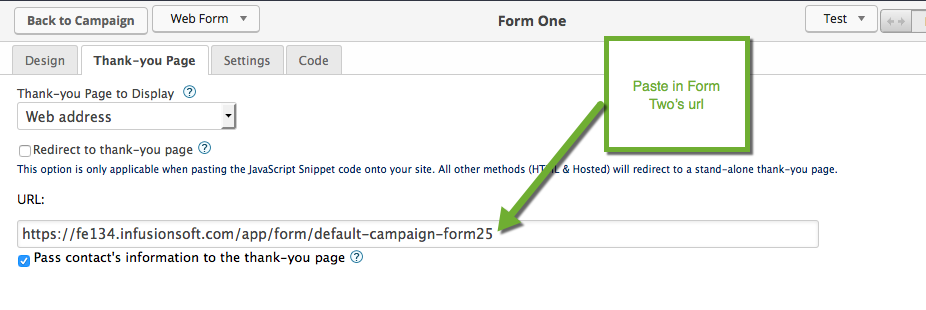
    Set the Thank-you Page to Display to Web address and make sure Pass contact’s information to the thank-you page is checked. 

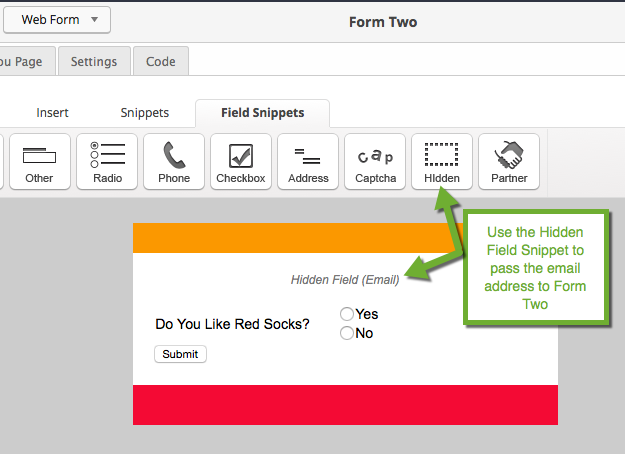
    step-three

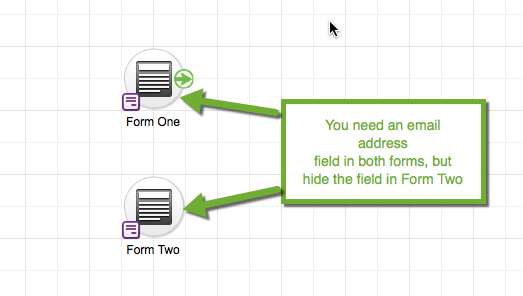
    On Form Two we’re passing the email info from Form One, but we’re hiding it from the contact. You set up your additional info gathering fields on this form.

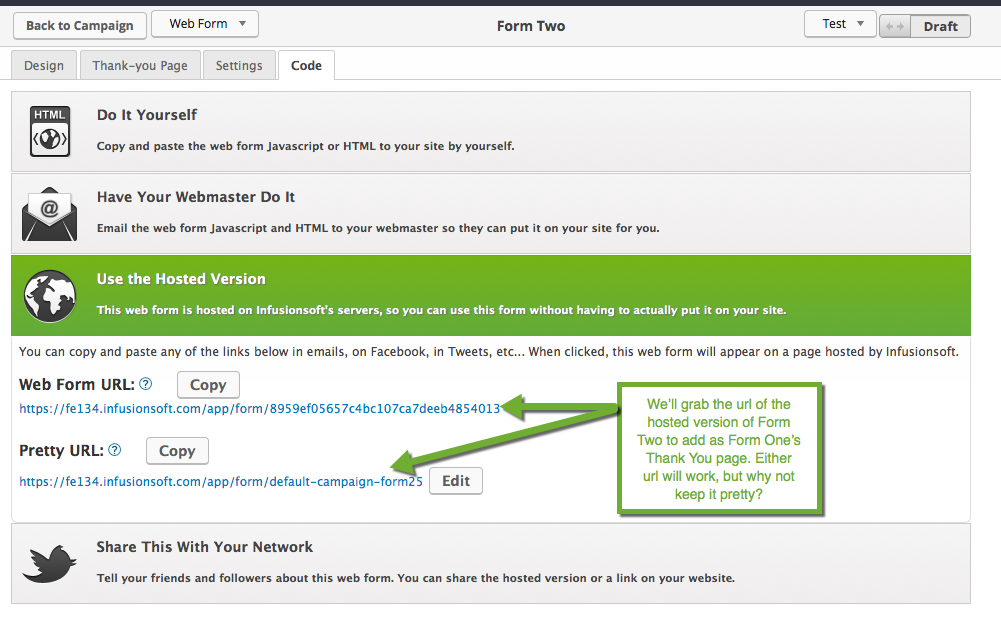
    step-four


    Copy Form Two’s Url to your clipboard and return back to Form One.

    step-five

    Return to Form One

    step-six

    Make sure everything is set to Ready. Publish your Campaign, and you’re all set to gather all the segmenting info you need or even do a quick upsell.

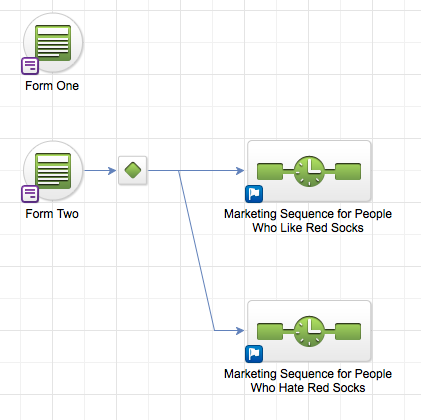
    Here’s an example of how you might segment your prospects with decision diamonds after gathering that extra info.  Market On!

    step-7


  • Avoid the Embarrassing “!!CORRECTED LINK” Email

    We’ve all been there – “Oh no, the email went out with the wrong link!” That’s when you want to reach into your computer screen and grab those emails back, but you can’t. Or can you?? Learn how easy it is to overcome this common mistake.

  • Why Use Click Funnels Over Lead Pages or Optimize Press?

    If you’re running a business with a digital presence there’s a good chance you’ve heard of Lead Pages or Optimize Press before.

    Both are well-established

    Both are providers of tools and templates for landing pages, sales funnels, membership portals, etc.

    Both claim to increase the ROI of your business.

    However, there is a new(ish) kid on the block when it comes to meeting the marketing and sales demands of digital business: Click Funnels.

    Though I only recently discovered Click Funnels, I am already super-excited to be talking to you about it for a variety of reasons, not the least of which is cost.

    As you know, maximizing the efficiency of dollars and cents is at the core of everything I do.

    Unlike Lead Pages or Optimize Press where funnel templates come with differing costs and differing features, Click Funnels’ functionality is not tied to price.  All the tools, tricks and utilities of their templates are included with the basic $97 per month Start-Up package (yes, they do have a more expensive Enterprise package, but it does not come with additional functions).

    More importantly, Click Funnels’ templates are completely customizable.

    While Lead Pages, Optimize Press and Click Funnels all come with a certain number of prefabricated templates, only Click Funnels allows for the development of fully-customizable templates, which is a huge advantage if you’re looking to have a landing page, optin or membership portal that is unique to your business.

    As a self-described integration-pro, there’s no way I can avoid mentioning how easily Click Funnels syncs with your favorite programs. From auto-responders and shopping carts (like GetResponse and Stripe) to marketing automation software (like Infusionsoft), Click Funnels is considerably more pro-integration than Lead Pages or Optimize Press.

    Here is short list of just some of the applications Click Funnels can integrate with:

    • GetResponse
    • Stripe
    • Infusionsoft
    • Taxamo
    • MailJet
    • MailChimp
    • Warrior+Plus
    • ClickBank
    • PayPal

    But wait, there’s more…

    Click Funnels versus Infusionsoft

    Click Funnels is so good that – in some instances – you should probably use it instead of Infusionsoft…And you know if I’m recommending something over Infusionsoft it must be good!

    What would these instances be?

    My Client is Not Ready for Infusionsoft

    If your client is not ready for the development-bandwidth needed for Infusionsoft, building out their sales and marketing funnels (or their entire website) is going to be a lot easier using Click Funnels. What Click Funnels lacks in robustness (when compared to Campaign Builder), it makes up for in clean, drag & drop functionality.

    Design Appeal

    As great as Infusionsoft is, sometimes you just have to call a spade a spade; it seriously lacks in the aesthetics department.

    The truth is, Infusionsoft does not make pretty pages but Click Funnels does. Five years ago, businesses could get away with having an unattractive site but in the today’s digital marketpalce a sharp, clean and streamlined look is key.

    Boost Conversion

    A great UI and UX are usually the difference between paltry and sizeable conversion numbers.

    A couple of weeks ago, we used Click Funnels for the first time to run the registration portal for the Mastery Class webinar. Not only did Click Funnels drive a conversion percentage of roughly 80%, but three separate registrants emailed me directly to say how much they loved the registration process – that has never happened before.

    Mobility

    Click Funnels is mobile responsive, Infusionsoft is not. With the increasing prevalence of mobile device usage, this fun fact speaks for itself.

    Help at the Ready

    When working with Infusionsoft, anytime you hit a roadblock you’re going to need the outside help of a whiz-developer or an Infusionsoft-pro like The API Guys.

    Translation? – Additional expense.

    The basic Start-Up package with Click Funnels comes with full and fanatical tech-support, a really, really nice bonus if you are lacking supplemental IT budget.

    Click Funnels, Lead Pages and Optimize Press: The Summation

    To sum it all up, here is a graphic you can use to compare Lead Pages, Optimize Press and Click Funnels:

    ClickFunnels

  • What We’re Reading – The ONE Thing

    The ONE ThingIf you chase two rabbits, you will not catch either one. Russian Proverb

    This week we’re reading The One Thing – The Surprisingly Simple Truth Behind Extraordinary Results by Gary Keller with Jay Papasan.

    Are you a slave to your to-do lists? Do you think juggling a hundred tasks simultaneously is a sign of productivity? Then you owe it to yourself to give this book a read. You’ll breeze through it over a weekend and come away with a profound process to reach extraordinary results in every facet of your life.

    Are these axioms you live by?

    • Everything Matters Equally
    • Multitasking
    • A Disciplined Life
    • Willpower Is Always on Will-Call
    • A Balanced Life
    • Big Is Bad

    Find out why they may not be serving you as well as you think. Learn how to find your one thing and stay focused on it. Ask yourself “What’s the ONE Thing you can do such that by doing it everything else will be easier or unnecessary?” Think about that for a moment, then grab a copy of The ONE Thing to learn how to incorporate that question into every part of your life for extraordinary results.

    We’ve started using the principles behind The ONE Thing in every part of our Infusionsoft business – from team review and planning meetings to quarterly goal setting. We’ve even put it into our client project strategies.  Let us know how you’re using your ONE thing.  We love discussing how it’s helping us reach our goals. 

  • Cool Tool – DilogR

    newsletter-dilogr1We came across DilogR while working on our online assessment tool to help users evaluate the gap between where they are and where they want to be with their Infusionsoft skills. We wanted interactivity with real time scoring and report generation. DilogR fit the bill. It’s an easy platform that takes interactive content to the next level. It has a seamless Infusionsoft integration to easily capture new leads, higher conversion rates and more business.

    Here’s just a few of their features, but be sure to check them out for yourself to get the full experience here.

    • Monetize photos and images in minutes
    • Personalize slide decks
    • Tailor video content to the viewer
    • Create surveys, quizzes, polls and assessments
    • Add CTAs
    • Add Lead generation forms
    • Add Hotspots
    • And more
  • Getting Started with Infusionsoft – Hang Out With the Pros

    Getting Started with InfusionsoftIf you’re just getting started with Infusionsoft you probably have lots of questions.  You’re not alone. We’ve all been there. Thankfully, Infusionsoft is super well documented. Type ug.Infusionsoft.com in your browser and the detailed User Guide is at your fingertips. Learning opportunities abound. Start with tutorials on Virtual Academy, take in a weekly Mastermind webinar for advanced strategies, and for the ultimate learning experience, attend the yearly ICON User Conference.

    Don’t Underestimate This Simple Tip

    There’s one tool you might overlook. It’s a habit, actually, that will launch your Infusionsoft skills light years ahead in an incredibly short time. Hang out with the Pros. Where do the Pros hang out? In the Infusionsoft Forums. Yes, it’s just that easy. One hour a day reading forum posts and solutions will get you confident with Infusionsoft in ways you never dreamed possible. Learn behind the scenes tricks veterans use to bend Infusionsoft to business needs. Be privy to free scripts and code snippets that make Infusionsoft hum. Access years of Infusionsoft knowledge.

    But you have to make it a habit.  

    Infusionsoft ForumsFollow this prescription:

    • Spend 1 Hour a Day in the Forums
    • Do it first thing in the morning
    • Forget checking Facebook or Twitter. The Infusionsoft forums are where the really cool kids are hanging
    • Try it for one month and report back here to let us know how much you’ve learned
  • Campaign Builder Do’s & Don’ts Webinar Replay

    Summary:

    In Campaign Builder Do’s & Don’ts, 2014 Infusionsoft Most Helpful Partner, Kim Snider, introduces the audience to some of her most fundamental Do’s and Don’ts for Campaign Builder. During the video, Kim covers her core beliefs, best time-saving tips and key mistakes to avoid, finishing the webinar with a robust Q&A session.

    Campaign Builder Do’s & Don’ts:

    Video no longer available.

    Time Stamped Show Notes:

    • 00:01 – Welcome from Kim Snider, the President of The API Guys, featuring a two-minute introduction and personal background summary
    • 03:47 – Kim’s goal with The API Guys (from a business perspective) is to take the business from start-up to $2 million dollars by the conclusion of 2016
    • 04:55 – What Kim Believes….
      • 05:10 – Small business is the heart of a thriving economy
      • 06:17 – 99% of Infusionsoft users are only using a tiny fraction of Infusionsoft
      • 07:30 – The key to small business success is investing in multiple efforts
      • 08:30 – Infusionsoft always can
    • 11:35 – Starting with the 3 Mistakes That Can Crash Your App
      • 12:05 – The #1 mistake people make?—Having too many tags
        • 12:55 – The more contacts you have, the bigger the problem this is
        • 13:25 – The best practices for tagging
      • 21:35 – The #2 mistake people make?—Too many saved searches
      • 25:08 – The # 3 mistake people make?—Importing data to the wrong fields
        • 26:50 – The most common error?—Entering the phone number into the phone type field
      • 27:00 – Bonus Tip: Multiple tabs open will not crash or slow down your app, but it can have unintended/weird consequences
    • 30:26 – Three Time-Saving Tips No One Uses
      • 30:33 – Time-saving tip #1: Nobody takes advantage of the “Copy From…” function
      • 33:57 – Time-saving tip #2: Use Campaign Merge Fields
      • 36:00 – Time-saving tip #3: Use Campaign Links
      • 41:45 – Bonus Tip: Many people forget to do a simple copy and paste within a campaign
      • 44:07 – Bonus Tip: Learn how to add to a sequence without deleting lines
      • 44:55 – Bonus Tip: Use Firefox to avoid going back to List Page when you delete lines
    • 45:50 – Three Ways to Shorten the Learning Curve
      • 47:05 – Way #1: Go to the Infusionsoft forums and Read/Answer the forum every morning
      • 48:00 – Way #2: Participate in the Infusionsoft Facebook groups
        • 48:40 – The two Infusionsoft Facebook groups operated by The API Guys
      • 49:55 – Way #3: Join the Infusionsoft Mastermind calls and webinars
      • 50:52 – Bonus Tip: Sign up for The Art of Campaign Building Foundations Course
    • 51:25 – Foundations Course summary
      • 56:15 – Training, more than anything else, is the one-thing that will make Infusionsoft easier
      • 56:55 – Defining who specifically the Art of Campaign Building Foundations Course is for…
      • 57:30 – Preview of the course syllabus
      • 58:00 – Schedule and Pricing outline
      • 59:26 – Registration Link
    • 62:00 – Questions and Answers
    • 86:49 – Kim’s contact information
    • 87:41 – End of Webinar

    5 Key Points

    1. Most Infusionsoft users are only using a fraction of Infusionsoft’s capabilities; this is not only foolish, it’s wasteful.
    2. Do not become contaminated with a case of the “can’ts;” 99% of the time Infusionsoft can
    3. Teaching is the key to learning; the better someone can teach a topic, the more quickly they will master it.
    4. Having too many tags is far and away the #1 mistake that most people make.
    5. Adequate training will make Infusionsoft significantly easier to use.