
[wc_accordion collapse=”1″ leaveopen=”0″ layout=”box”]
[wc_accordion_section title=”Installing the Plug-In”]
Installing the Plug-In
You should have installed your Infusionsoft Pocket Developer plug-in using the instructions provided, if for any reason you have not installed your Pocket Developer plug-in click here to learn how.
[/wc_accordion_section]
[wc_accordion_section title=”Configuring the HTTP Post Snippet”]
Configuring the HTTP Post Snippet
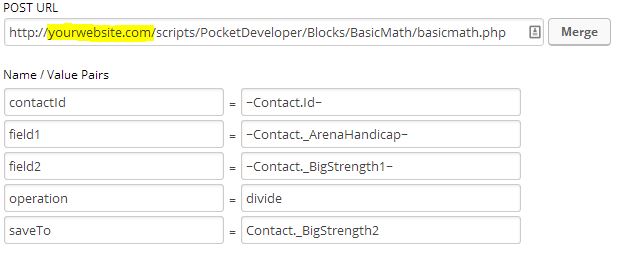
[wc_box color=”inverse” text_align=”left”]
 NOTE: Everything in an HTTP POST is case sensitive. That includes the URL, the parameters on the left and the field names on the right. If caPitaLizaTion is wrong, your post will not work.
[/wc_box]
[wc_box color=”inverse” text_align=”left”]
 ANOTHER NOTE: The merge field in the saveTo parameter should never have tildes around it (~). If you use the merge button to add a field, make sure to remove them for this parameter. We are saving to, not merging from.
[/wc_box]
URL:
The URL, on your server, where the Pocket Developer script is stored. For example:
http://yourdomain.com/scripts/PocketDeveloper/Blocks/TagsFly/tagsfly.php
Required Name/Value Pairs:
field1
- This is field one of two whose value will be the basis for some basic operation.
- It can be any standard or custom contact field. Alternatively, the value assigned to this variable can be a literal constant like 3, 2, 2.1, etc.
field2
- This is field two of two whose value will be the basis for some basic operation.
- It can be any standard or custom contact field. Alternatively, the value assigned to this variable can be a literal constant like 3, 2, 2.1, etc.
operation
- This is the name of the basic operation to be performed on ‘field1’ and ‘field2.’
- It can be any of the following: ‘add’, ‘addition’, ‘subtract’, ‘subtraction’, ‘multiply’,’multiplication’, ‘divide’, ‘division’saveTo (Optional if using ‘request’)
- This is the field where the result of the evaluation will be stored, suchas _ArenaHandicap or Contact._CustomField1
contactId
- This is the contact Id for the contact record where fields will be retrieved(if any) and where the result of the arithmetic will be stored
Optional Name Value/Pairs:
request
- This is a URL to query at the end of the operation. The merge field {result}can be placed anywhere within the URL to include the result of the operation,allowing you to pass the value to another script
[/wc_accordion_section]
[wc_accordion_section title=”Demo Video”]
Demo Video
[/wc_accordion_section]
[wc_accordion_section title=”Pro Tips”]
Pro Tips
[/wc_accordion_section]
[wc_accordion_section title=”Frequently Asked Questions”]
Frequently Asked Questions
[/wc_accordion_section]
[wc_accordion_section title=”Buy Basic Math”]
Buy Basic Math
You can buy Basic Math from our plug-in store.
[/wc_accordion_section]
[/wc_accordion]