
[wc_accordion collapse=”1″ leaveopen=”0″ layout=”box”]
[wc_accordion_section title=”Installing the Plug-In”]
Installing the Plug-In
Note: You should have installed your Infusionsoft Pocket Developer plug-in using the instructions provided, if for any reason you have not installed your Pocket Developer plug-in click here to learn how.
[/wc_accordion_section]
[wc_accordion_section title=”Configuring the HTTP Post Snippet”]
Configuring the HTTP Post Snippet
[wc_box color=”inverse” text_align=”left”]
 NOTE: Everything in an HTTP POST is case sensitive. That includes the URL, the parameters on the left and the field names on the right. If caPitaLizaTion is wrong, your post will not work.
[/wc_box]
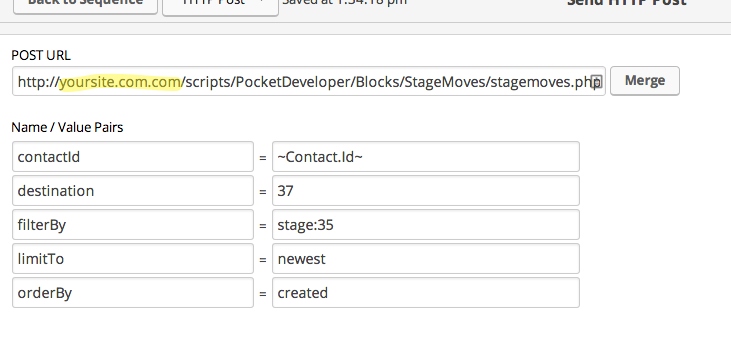
URL:
The URL, on your server, where the Pocket Developer script is stored. For example:
http://yourdomain.com/scripts/PocketDeveloper/Blocks/TagsFly/tagsfly.php
Required Name/Value Pairs:
contactId
- This is the contact Id for the contact record where fields will be retrieved (if any) and for whom opportunity records will be queried
destination
- The destination StageID to move all opportunities found for the specified contact record, which may or may not be limited by optional filtering criteria.
- All opportunities found will be set to this specified destination StageID
OptionalName/Value Pairs:
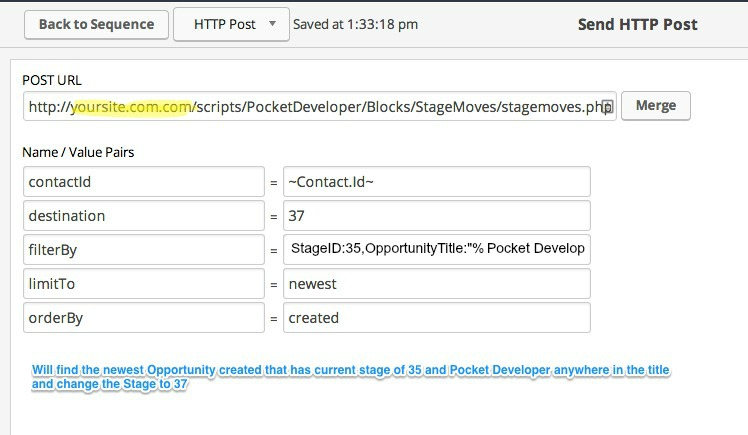
filterBy
- Filter by any field in an Opportunity, as follows:
- For a number or ID field -> StageID:32
- For a text field -> OpportunityTitle:”My Text” or OpportunityTitle:”My Text%” or OpportunityTitle:”%My Text%”
- For a date field -> NextActionDate:”200409%”
- Filters can be combined to further narrow down a contact’s opportunities.
Examples:
1. UserID:3
Will only return opportunities currently at stage #3
2. StageID:3,AffiliateID:4
Will only return opportunities at stage #3 that was referred by affiliate #4
3. UserID:4,UserID:5
Will return opportunities at any stage that originated from affiliate #4 and has been assigned to owner #5
4. UserID:3,UserID:4,UserID:5
Will return opportunities at stage #3 that originated from affiliate #4 and has been assigned to owner #5
5. UserID:3,UserID:4,UserID:5,OpportunityTitle:”%Pocket Developer%”
Will return opportunities at stage #3 that originated from affiliate #4, assigned to owner #5 that has “Pocket Developer in the title
limitTo
- Opportunity filterBy results can be limited by using the values of ‘oldest’/’first’ or ‘newest’/’last’ to limit the result to a single opportunity.
orderBy
- Used in combination with ‘limitTo,’ this parameter allows you to order the resulting opportunity lookup by the values ‘created’ or ‘updated’ (default ordering is by last updated timestamp)
[/wc_accordion_section]
[wc_accordion_section title=”Demo Video”]
Demo Video
[/wc_accordion_section]
[wc_accordion_section title=”Pro Tips”]
Pro Tips
[/wc_accordion_section]
[wc_accordion_section title=”Frequently Asked Question”]
Frequently Asked Questions
[/wc_accordion_section]
[/wc_accordion]